Time for another quick look at what’s happening with tool windows in Dragablz.
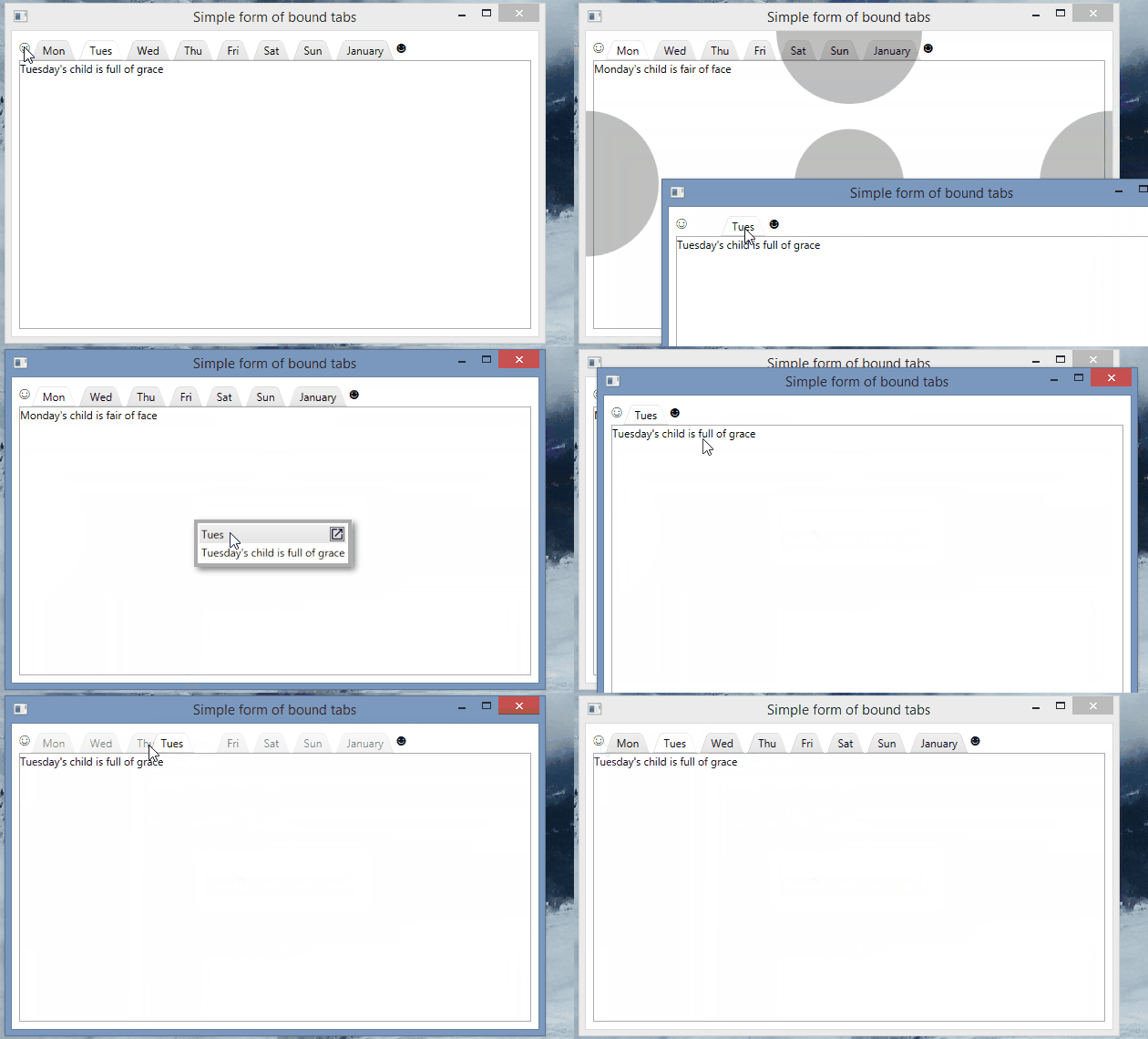
You can now take a tab, tear it out, and then drop it straight back in, but as a tool window…neat! The tool window can then be popped out, back into a first class window and tab control of it’s own.
At some point I will try and get floating tabs on the tool window layer, so you can organise even further, but still in the user-friendly manner I am trying to push in Dragablz.
Also, soon I hope to create a nice demo app mixing in a Modern UI theme courtesy of MahApps, demonstrating how to really re-ignite the power of desktop apps, so keep an eye out.
If you like this library please help motivate me and star it on GitHub!
The Dragablz feature set is come together nicely now, it’s more than just a Chrome style tear out tab control. Much more. I just quickly wanted to provide a look at the way the DragablzItemsControl can be used to generate a tool window effect. As always, there’s more to come!
We all have our favourite IDE, and they all provide pretty advanced docking features. Many control libraries in WinForms, WPF, Swing etc have provided this functionality over the years. But are docking suites – which can be complex, fiddly beasts – designed by and for developers what other users really want?
Remember when Google first released Chrome? Tearing tabs out immediately felt so easy and natural I wondered why no-one had done it before. It was one of those UX paradigms that just works. So in designing the docking library for Dragablz I wanted to reduce the complexity of what we have come to expect and provide a UX experience that is much more easy and free flowing. I’ve tried this before on an enterprise application I have been working on and it’s pretty successful with the user base.
The gif below illustrates the simplicity of having quick, easy access dock “zones” that are easy to throw a tab into, instead of having more, smaller, fiddly areas which are harder to hit in traditional setups.
Easy Docking With Dockablz
There’s still a little way to go to polish up the code but the basics can be seen in the demo project in the main solution in GitHub.
Assuming you have a reference to the Dragablz assembly, getting tear-able tabs from the TabablzControl is a doddle. The TabablzControl inherits from the standard TabControl so it should be pretty familiar. The first thing you have to look out for is the InterTabController property. You will need to provide an InterTabController instance to inform the tab that you are going to let the user tear out tabs:
That’s all you have place in your XAML Window to achieve this:
Tearable tabs – quickly!
I am the master!
OK, so now I imagine you have some questions…such as, how does this work with bound data sources and MVVM? Can I manage the window creation myself?
Well, jumping in and seizing some control for yourself is easy.
The key is setting the InterTabClient property on your InterTabController instance.
You’ll quickly see there are two interfaces involved:
IInterTabClient – let’s you intercept the requirement to create a new window (and tab control) when the user tears out a tab.
INewTabHost – the result of IInterTabClient.GetNewHost. A simple implementation is provided: Dragablz.NewTabHost
The simplest implementation of IInterTabClient will look something like this:
public class MyInterTabClient : IInterTabClient
{
    public INewTabHost GetNewHost(IInterTabClient interTabClient, object partition, TabablzControl source)
    {
        var view = new MyWindow();
        return new NewTabHost(view, view.TabablzControl); //TabablzControl is a names control in the XAML
    }

    public TabEmptiedResponse TabEmptiedHandler(TabablzControl tabControl, Window window)
    {
        return TabEmptiedResponse.CloseWindow;
    }
}
If you expose an instance of your MyInterTabClient class from you view model, you can bind it into the TabablzControl, via the InterTabController:
Now you should be on the road to integration with the rest of your application code or framework. For more help take a look at the examples found in the GitHub project.
After some fiddling with Git, TeamCity and NuGet, a package for Dragablz is now published. Straight off the bat I must apologise for this only being a .Net 4.5 version; I know there is plenty of enterprise out there still on .Net 4.0. A .Net 4.0 version will follow in due course…
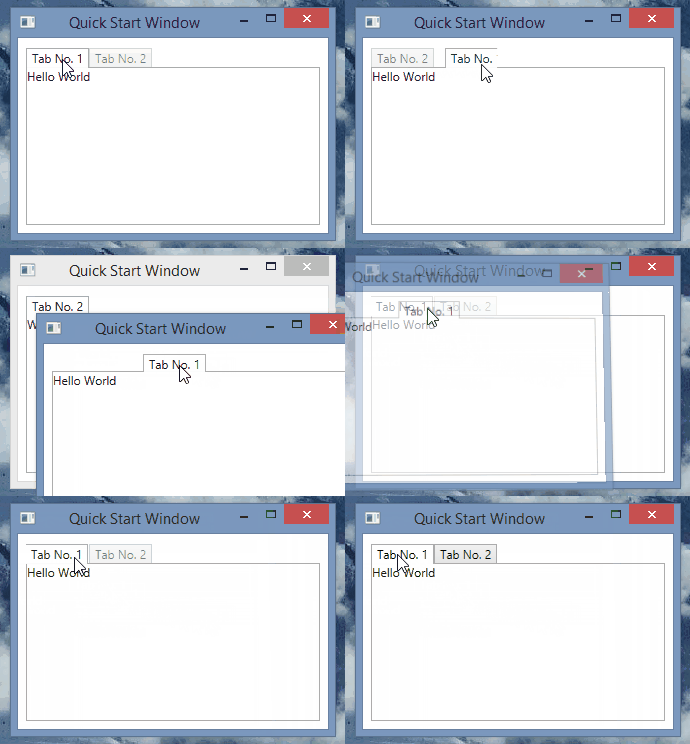
It’s still early, but the dragable, tearable tab control for WPF, “dragablz” is now up on GitHub. There is a demo project – pretty basic – but illustrates what to do.
I intend to build out more functionality, styles and documentation, so expect to see improvements, especially over Christmas 2014/2015 as I have a few weeks off the day job.
Even the web is old hat these days. If you aren’t writing some sort of touch device software you might as well be coding in COBOL. Right?
Wrong!
There are still plenty of desktop requirements out there. I do a lot of work in the enterprise, and – in the enterprise at least – there is still demand for the full richness of desktop software.
A lot of my work is in C# and WPF these days. But WPF is dead, right?
Wrong!
WPF is a great, powerful framework (if it comes with a steep learning curve), but every project I work on I keep banging my head against a couple of core problems. After improving/fixing/retro-fitted some other apps I am now writing a new open source library to solve the main problem. That of fully drag-able (is that a word?) tabs. Chrome/IE style.
There’s plenty of people asking the question on the web, and a few solutions, but I think I have a pretty good mechanism for doing this, so watch this space for what’s coming soon…




 dragablz.net