
Assuming you have a reference to the Dragablz assembly, getting tear-able tabs from the TabablzControl is a doddle. The TabablzControl inherits from the standard TabControl so it should be pretty familiar. The first thing you have to look out for is the InterTabController property. You will need to provide an InterTabController instance to inform the tab that you are going to let the user tear out tabs:
<dragablz:TabablzControl Margin="8">
    <dragablz:TabablzControl.InterTabController>
        <dragablz:InterTabController />
    </dragablz:TabablzControl.InterTabController>
    <TabItem Header="Tab No. 1" IsSelected="True">
        <TextBlock>Hello World</TextBlock>
    </TabItem>
    <TabItem Header="Tab No. 2">
        <TextBlock>We Have Tearable Tabs!</TextBlock>
    </TabItem>
</dragablz:TabablzControl>
That’s all you have place in your XAML Window to achieve this:
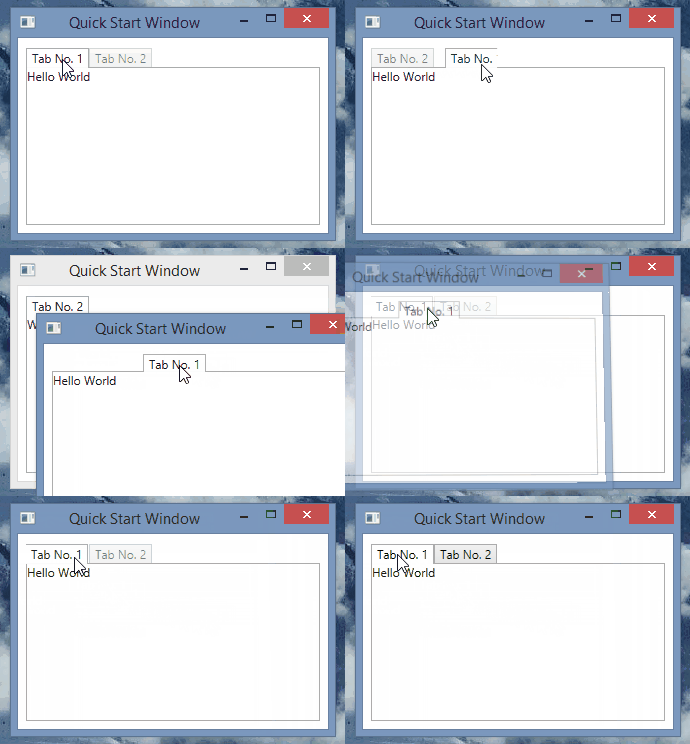
I am the master!
OK, so now I imagine you have some questions…such as, how does this work with bound data sources and MVVM? Can I manage the window creation myself?
Well, jumping in and seizing some control for yourself is easy.
The key is setting the InterTabClient property on your InterTabController instance.
You’ll quickly see there are two interfaces involved:
- IInterTabClient – let’s you intercept the requirement to create a new window (and tab control) when the user tears out a tab.
- INewTabHost – the result of IInterTabClient.GetNewHost. A simple implementation is provided: Dragablz.NewTabHost
The simplest implementation of IInterTabClient will look something like this:
public class MyInterTabClient : IInterTabClient
{
    public INewTabHost GetNewHost(IInterTabClient interTabClient, object partition, TabablzControl source)
    {
        var view = new MyWindow();
        return new NewTabHost(view, view.TabablzControl); //TabablzControl is a names control in the XAML
    }

    public TabEmptiedResponse TabEmptiedHandler(TabablzControl tabControl, Window window)
    {
        return TabEmptiedResponse.CloseWindow;
    }
}
If you expose an instance of your MyInterTabClient class from you view model, you can bind it into the TabablzControl, via the InterTabController:
<dragablz:InterTabController InterTabClient="{Binding MyInterTabClientInstance}" />
Now you should be on the road to integration with the rest of your application code or framework. For more help take a look at the examples found in the GitHub project.

 dragablz.net