The Dragablz feature set is come together nicely now, it’s more than just a Chrome style tear out tab control. Much more. I just quickly wanted to provide a look at the way the DragablzItemsControl can be used to generate a tool window effect. As always, there’s more to come!
We all have our favourite IDE, and they all provide pretty advanced docking features. Many control libraries in WinForms, WPF, Swing etc have provided this functionality over the years. But are docking suites – which can be complex, fiddly beasts – designed by and for developers what other users really want?
Remember when Google first released Chrome? Tearing tabs out immediately felt so easy and natural I wondered why no-one had done it before. It was one of those UX paradigms that just works. So in designing the docking library for Dragablz I wanted to reduce the complexity of what we have come to expect and provide a UX experience that is much more easy and free flowing. I’ve tried this before on an enterprise application I have been working on and it’s pretty successful with the user base.
The gif below illustrates the simplicity of having quick, easy access dock “zones” that are easy to throw a tab into, instead of having more, smaller, fiddly areas which are harder to hit in traditional setups.
Easy Docking With Dockablz
There’s still a little way to go to polish up the code but the basics can be seen in the demo project in the main solution in GitHub.
Assuming you have a reference to the Dragablz assembly, getting tear-able tabs from the TabablzControl is a doddle. The TabablzControl inherits from the standard TabControl so it should be pretty familiar. The first thing you have to look out for is the InterTabController property. You will need to provide an InterTabController instance to inform the tab that you are going to let the user tear out tabs:
That’s all you have place in your XAML Window to achieve this:
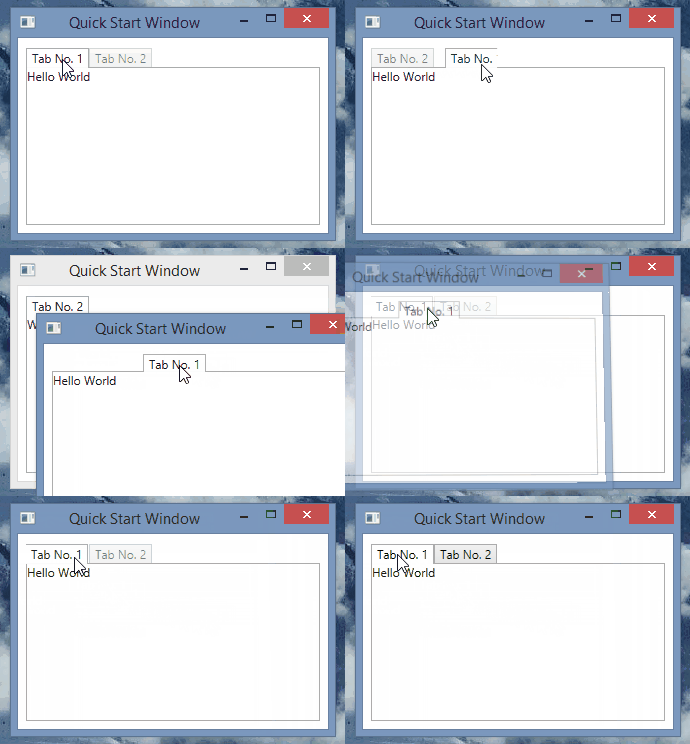
Tearable tabs – quickly!
I am the master!
OK, so now I imagine you have some questions…such as, how does this work with bound data sources and MVVM? Can I manage the window creation myself?
Well, jumping in and seizing some control for yourself is easy.
The key is setting the InterTabClient property on your InterTabController instance.
You’ll quickly see there are two interfaces involved:
IInterTabClient – let’s you intercept the requirement to create a new window (and tab control) when the user tears out a tab.
INewTabHost – the result of IInterTabClient.GetNewHost. A simple implementation is provided: Dragablz.NewTabHost
The simplest implementation of IInterTabClient will look something like this:
public class MyInterTabClient : IInterTabClient
{
    public INewTabHost GetNewHost(IInterTabClient interTabClient, object partition, TabablzControl source)
    {
        var view = new MyWindow();
        return new NewTabHost(view, view.TabablzControl); //TabablzControl is a names control in the XAML
    }

    public TabEmptiedResponse TabEmptiedHandler(TabablzControl tabControl, Window window)
    {
        return TabEmptiedResponse.CloseWindow;
    }
}
If you expose an instance of your MyInterTabClient class from you view model, you can bind it into the TabablzControl, via the InterTabController:
Now you should be on the road to integration with the rest of your application code or framework. For more help take a look at the examples found in the GitHub project.


 dragablz.net